About Solitaire Social – Jungle Edition
Solitaire Social – Jungle Edition is a browser-based Klondike solitaire card game presented with a jungle-themed interface. Players arrange cards across seven tableau columns, build each suit from Ace through King in the foundations, and use the stock and waste piles to uncover useful cards. Completing all four foundations clears the game and advances progression.
The primary objective is to move all 52 cards into the four foundation piles, building each suit in ascending order from Ace to King.
Secondary goals include:
- Reveal face-down tableau cards.
- Build tableau sequences in descending rank with alternating colors.
- Earn score while completing the foundations and revealing hidden cards.
- Complete levels and unlock subsequent levels.
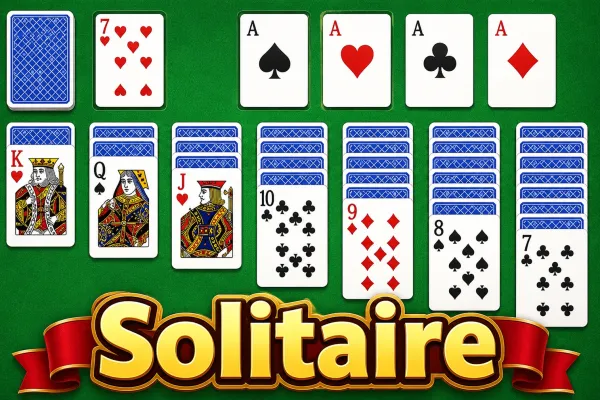
Solitaire Social – Jungle Edition is a Klondike-style card game built around the familiar goal of moving all 52 cards into four suit-specific foundations. The game begins with seven tableau columns containing a mixture of face-down and face-up cards, while the remaining deck forms the stock. Players can draw cards from the stock into the waste pile and use available cards to build the tableau or advance the foundations.
Tableau sequences are built downward using alternating card colors, while foundation piles must be built upward by suit from Ace through King. Moving a card that exposes a face-down card automatically turns that newly exposed card face up and awards additional points. Foundation placements also increase the score.
Cards can be dragged with a pointer, while tapping a playable card attempts an automatic move to a suitable foundation or tableau column. The interface provides solitaire games for players looking for similar card-based gameplay and board games for other browser-based tabletop experiences.
A Hint button highlights an available move when one can be found, and Undo lets players reverse recent moves. The game also includes strategy games and puzzle games as relevant categories for players interested in planning-oriented gameplay. Progress and active-game state are stored locally in the browser.
How to Play
- Select Play Game from the main menu to begin a level.
- Review the seven tableau columns, the stock, the waste pile, and the four foundation spaces.
- Build tableau sequences downward using alternating red and black cards.
- Move cards to the foundations in their matching suit, starting with the Ace and continuing upward through the King.
- Click or otherwise activate the stock to draw a card into the waste pile. When the stock is empty, it can be recycled from the waste pile.
- Drag cards to valid tableau or foundation destinations. Tapping a playable card attempts an automatic valid move.
- Reveal face-down tableau cards whenever possible; newly exposed cards are automatically turned face up.
- Use Hint to highlight an available move and Undo to reverse a previous move when necessary.
- Continue until all 52 cards have been moved to the foundations.
- When the level is completed, the Victory screen displays the score and elapsed time and provides a Next Level option.
Winning & Losing Conditions
Winning Condition
A level is won when all 52 cards are in the four foundation piles, with each foundation built by suit from Ace through King.
Losing Condition
There is no traditional losing condition or game-over state implemented. The player can continue making moves, recycle the stock when it is empty, use Undo, or restart the current level.
Features
- Klondike-style solitaire gameplay
- 20 selectable levels
- Seven tableau columns
- Four suit-specific foundation piles
- Stock and waste piles
- Score tracking
- Move counter
- Elapsed-time counter
- Hint system
- Undo system
- Pause and resume
- Restart Level option
- Main menu and level selection
- Level unlocking progression
- Local browser progress saving
- Sound effects with an on/off setting
- Touch/pointer interaction
- Responsive mobile interface
- Victory screen with score and completion time
Tips & Strategies
- Prioritize revealing face-down cards. Exposing hidden tableau cards can create additional playable options and awards score when a hidden card is turned face up.
- Use alternating colors carefully. Tableau moves require descending ranks with opposite colors, so avoid occupying useful columns without considering future placements.
- Build foundations deliberately. Foundation cards must follow the correct suit and ascending rank, so move cards there when doing so does not unnecessarily restrict tableau play.
- Use the stock strategically. The stock can be recycled after it is emptied, so consider the cards available in the waste pile before drawing further.
- Use Hint when the board becomes difficult to read. The Hint feature highlights an available move when one is detected.
- Use Undo to recover from a poor move. Recent game states are stored for reversal, making Undo useful when a move blocks a better sequence.